I had recently written an article about unlocking of Reliance EC1260 CDMA 3G dongle modem Datacard broadband Free, Unlocking of Reliance EC150 Huawei CDMA EVDO Modem Dongle Data Card Free. While updating the firmware, various people face a problem: it asks for SPC code, not Firmware Code, so unable to unlock their modem. Today, I am writing in detail to Get the SPC Code free via the DFS CDMA tool. So, users can easily generate the SPC code to unlock their CDMA Huawei reliance modems.
How to Get SPC Code Free of any Huawei or ZTE Modem?
1. Download DFS CDMA tool V 3.1.0.1 from the download link provided at the end of the article.
2. Now extract the downloaded zip file in a folder.
3. Now plug your CDMA Huawei or ZTE modem, for which you want to get the SPC code.
4. Now check the COM port on which your modem is connected; to check the COM port of the modem, refer to this article.
5. Now run the dfs.exe file from the DFS folder, which you have already downloaded.
6. Now click on Manager from the left side and double click on the port, and now your modem will be connected to the DFS CDMA tool.
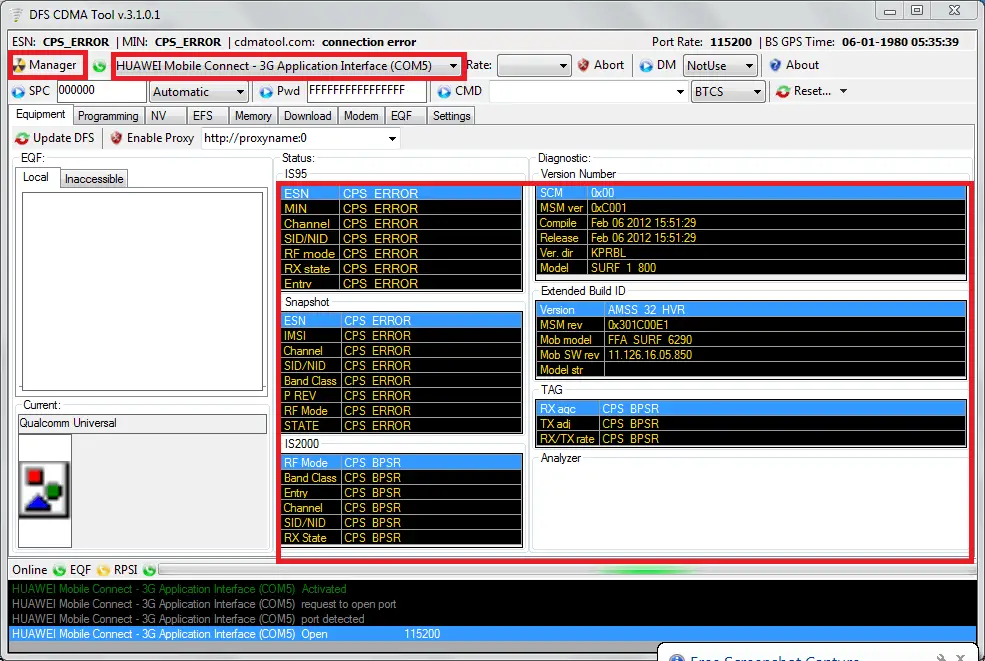
7. Now DFS tool will start reading your CDMA modem info, and it will start updating the data as in the screenshot.
8. After around 2 minutes, when data will be updated in the DFS CDMA tool, click on the Memory tab.
9. Herein left side in Type “RAM” will be visible.
10. Click on the drop-down and change the “RAM” to “CEFS” as available in the above screenshot.
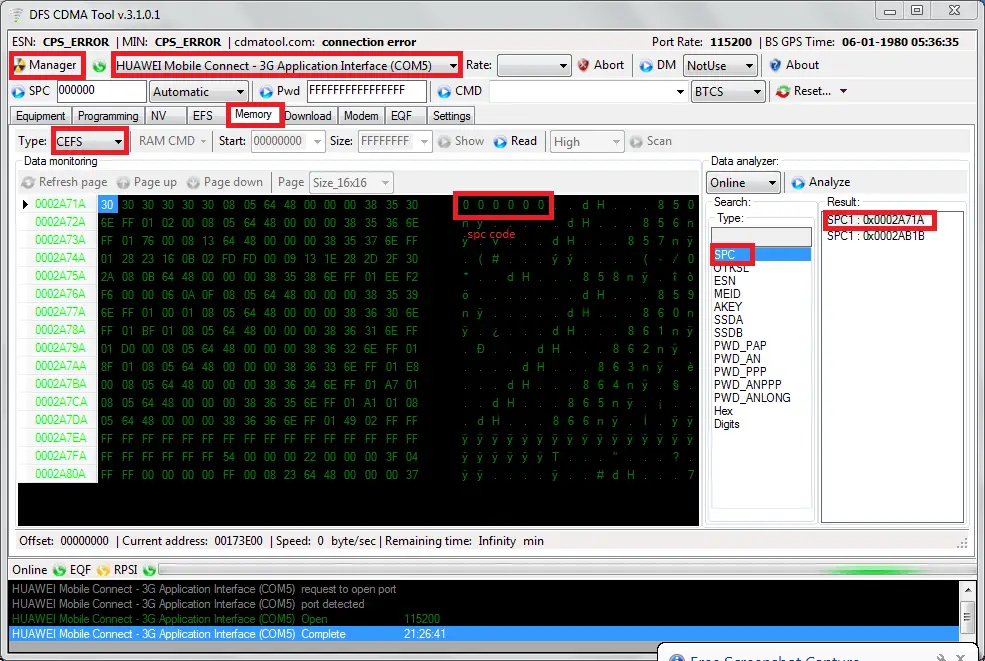
11. Now click on the read button from the menu.
12. Now, on the right top below the type, double click on SPC.
13. Now, on the right side of SPC, SPC1 will come.
14. Double click on SPC 1.
15. Now, on the main screen, SPC code will appear, as highlighted in the above screenshot.
16. Now you have got the Correct SPC code, now follow the rest of the procedure to unlock your modem.
Download DFS Tool Free Version 3.1.0.1