Today, I am writing an article to unlock the EC1262 Huawei 3G CMDA EVDO Modem Dongle Datacard. Various network providers provided CDMA 3G Modem Dongle to their users. Unlocking the CDMA modem is difficult than GSM 3G / 4G modems/routers. I have found some ways to unlock EC1262 Huawei 3G CMDA EVDO Modem Dongle for free. Interest users who have CDMA dongle can contact me or comment in the comment box if any problem in unlocking their EC1262 Huawei 3G CMDA EVDO Modem Dongle. The below-provided solution will unlock your EC1262 Huawei 3G CMDA EVDO Modem Dongle fully. If you are interested, then you can try it out.
How to Unlock EC1262 Huawei 3G CMDA EVDO Modem Dongle Free?
1. Download the EC1262 Huawei 3G CMDA EVDO Modem Dongle firmware, which downloads link is provided at the end of the article.
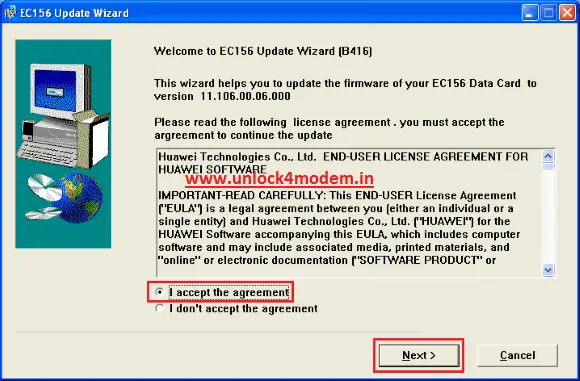
2. Now, unzip and run the firmware update file.
3. Accept the agreement and click on the Next button to proceed.
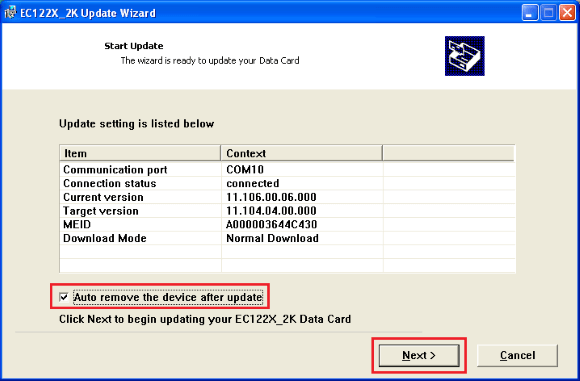
4. On the following window, put a check on ‘Auto remove the device after update’ and click Next
5. Read the warning message and click on the Start button.
7. Put the password of your MEID. (To get the firmware code of your MEID, comment your MEID).
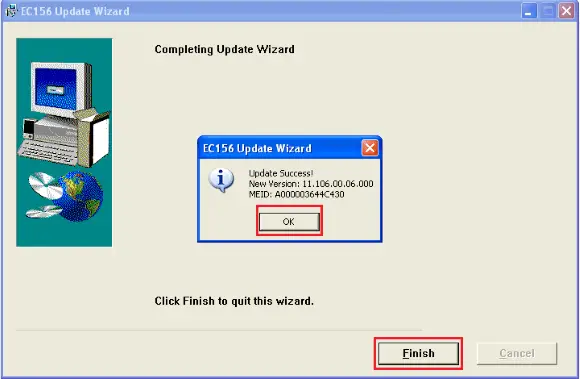
8. Follow the online screen to the finish button.
9. Now, you have successfully finished the firmware update of your EC1262 Huawei 3G CMDA EVDO Modem Dongle.
10. Now download the CDMA workshop tool 2.7 Pre-cracked version from the download link at the end of the article.
11. Now extract in a folder and run it.
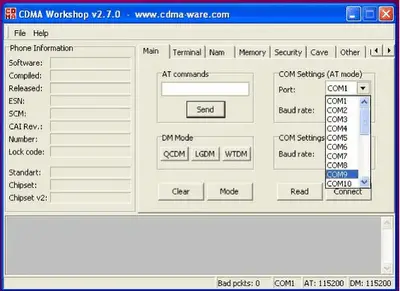
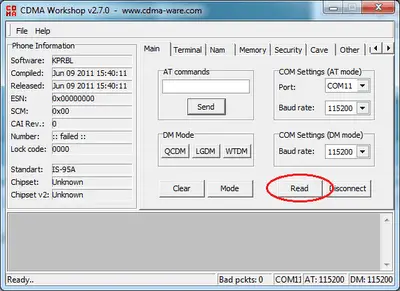
12. Now, in the COM port drop-down list, select the COM port to which you have connected the EC1262 Huawei 3G CMDA EVDO Modem Dongle. (To get the COM Port read this article.)
13. Now, after detecting the COM port, click on Connect, and your EC1262 Huawei 3G CMDA EVDO Modem Dongle will be connected to the CDMA Workshop 2.7.0 tool.
14. After the EC1262 Huawei 3G CMDA EVDO Modem Dongle is connected, select the security tab and click the Read button.
Read flash in CDMA workshop
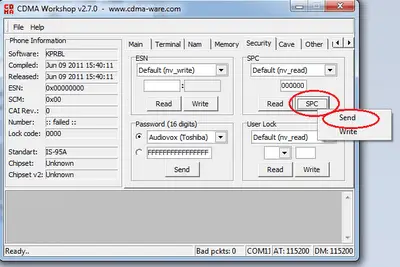
15. When the SPC code is available in the box, click on the SPC button.
16. Now, you will get two options, Send and Write, as in the below screenshot. Click on the Send button, and you will get a message SPC accepted.
Send SPC as Default in CDMA workshop.
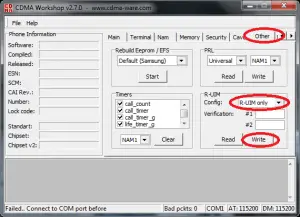
17. Now select the Other tab, and in the RUIM – select RUIM if available or to RUIM only and click on the write button. Now you have successfully unlocked your EC1262 Huawei 3G CMDA EVDO Modem Dongle.
CDMA modem unlock RUIM options
Note: Now, you can use CDMA inbuilt and CDMA of another network provider facility in your EC1262 Huawei 3G CMDA EVDO Modem Dongle. If you select RUIMonly, then the default CDMA service will not work. If you select RUIM if available, you can use CDMA service without the SIM and CDMA of another network provider when you insert the SIM into the EC1262 Huawei 3G CMDA EVDO Modem Dongle.
Users are requested to share the successful story to help each other.
Unlock solutions of Huawei EC367, EC226, EC186, EC167, EC156, EC150 EC1260, and EC122 CDMA EVDO modems are also available; search and unlock your CDMA dongle free.
Now download the latest Unbranded Huawei Mobile Partner Software from this link to use another network provider SIM on your unlocked EC1262 CDMA Huawei modem.