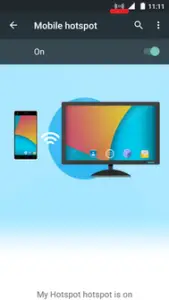
We all know about the purpose of WiFi on the internet. WiFi is used to share/receive a network between different WiFi-enabled devices. We generally use a router for WiFi hotspot purposes. WiFi hotspot provides an internet connection to WiFi-enabled within its range. If you don’t have a router, but you want to share the internet connection using your smartphone, it is also possible. We can use a smartphone as a WiFi-hotspot to share the internet between Wi-Fi-enabled phones/computers/laptops. In this article, we will learn to use the ZTE smartphone as a portable WiFi hotspot.
How to use ZTE smartphone as a portable Wi-Fi hotspot?
Through this method, you can make your ZTE smartphone a hotspot. This method is applicable for all ZTE smartphones, including ZTE Blade A3, Z557, Grand X, X2, etc.
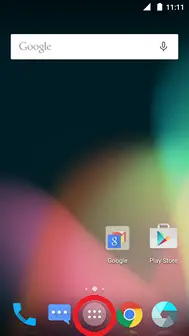
1. Unlock the phone screen and touch Apps.
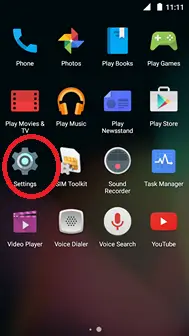
2. Scroll and touch Settings inbuilt app.
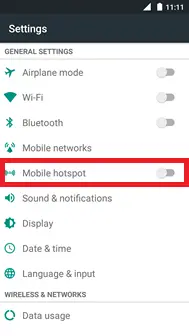
3. Touch Mobile Hotspot.
4. Touch the Menu icon from the right top corner.

5. Select Configuration.
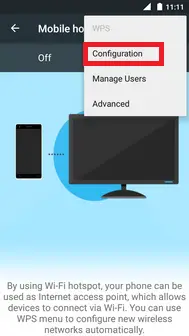
6. Under the Network name, delete the existing text and enter any name you want to save as a hotspot name.
Note: This hotspot name will be broadcasted by your phone.
7. Now, scroll and select Password.
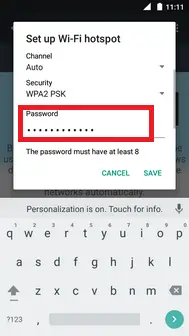
8. Delete the existing text under password and enter a new text as a password for your hotspot.
Note: Password should be at-least 8-digits / characters.
9. Select SAVE to save to hotspot name and password.

10. Now you have successfully configured WiFi-hotspot. Touch the Mobile hotspot slider to turn it ON.
 11. The portable Wi-Fi hotspot is now active and ready to connect with any WiFi-enabled device, including phone/computer/tablet.